IMPORTANT: Developer documentation for the current main branch.
This content is unreleased and may change before the next Polaris release.
For stable user documentation, see the
latest release docs.
Role-Based Access Control
This section provides information about how access control works for Apache Polaris.
Polaris uses a role-based access control (RBAC) model in which the Polaris administrator assigns access privileges to catalog roles and then grants access to resources to principals by assigning catalog roles to principal roles.
ℹ️ Info
For advanced authorization scenarios requiring external policy management or integration with existing policy infrastructure, Polaris supports integration with external Policy Decision Points (PDPs) such as Open Policy Agent (OPA). See External Policy Decision Point for more information.These are the key concepts to understanding access control in Polaris:
- Securable object
- Principal role
- Catalog role
- Privilege
Securable object🔗
A securable object is an object to which access can be granted. Polaris has the following securable objects:
- Catalog
- Namespace
- Iceberg table
- View
- Policy
Principal role🔗
A principal role is a resource in Polaris that you can use to logically group Polaris principals together and grant privileges on securable objects.
Polaris supports a many-to-many relationship between principals and principal roles. For example, to grant the same privileges to multiple principals, you can assign a single principal role to those principals. Likewise, a principal can be granted multiple principal roles.
You don’t grant privileges directly to a principal role. Instead, you configure object permissions at the catalog role level, and then grant catalog roles to a principal role.
The following table shows examples of principal roles that you might configure in Polaris:
| Principal role name | Description |
|---|---|
| Data_engineer | A role that is granted to multiple principals for running data engineering jobs. |
| Data_scientist | A role that is granted to multiple principals for running data science or AI jobs. |
Catalog role🔗
A catalog role belongs to a particular catalog resource in Polaris and specifies a set of permissions for actions on the catalog or objects in the catalog, such as catalog namespaces or tables. You can create one or more catalog roles for a catalog.
You grant privileges to a catalog role and then grant the catalog role to a principal role to bestow the privileges to one or more principals.
Polaris also supports a many-to-many relationship between catalog roles and principal roles. You can grant the same catalog role to one or more principal roles. Likewise, a principal role can be granted to one or more catalog roles.
The following table displays examples of catalog roles that you might configure in Polaris:
| Example Catalog role | Description |
|---|---|
| Catalog administrators | A role that has been granted multiple privileges to emulate full access to the catalog. Principal roles that have been granted this role are permitted to create, alter, read, write, and drop tables in the catalog. |
| Catalog readers | A role that has been granted read-only privileges to tables in the catalog. Principal roles that have been granted this role are allowed to read from tables in the catalog. |
| Catalog contributor | A role that has been granted read and write access privileges to all tables that belong to the catalog. Principal roles that have been granted this role are allowed to perform read and write operations on tables in the catalog. |
RBAC model🔗
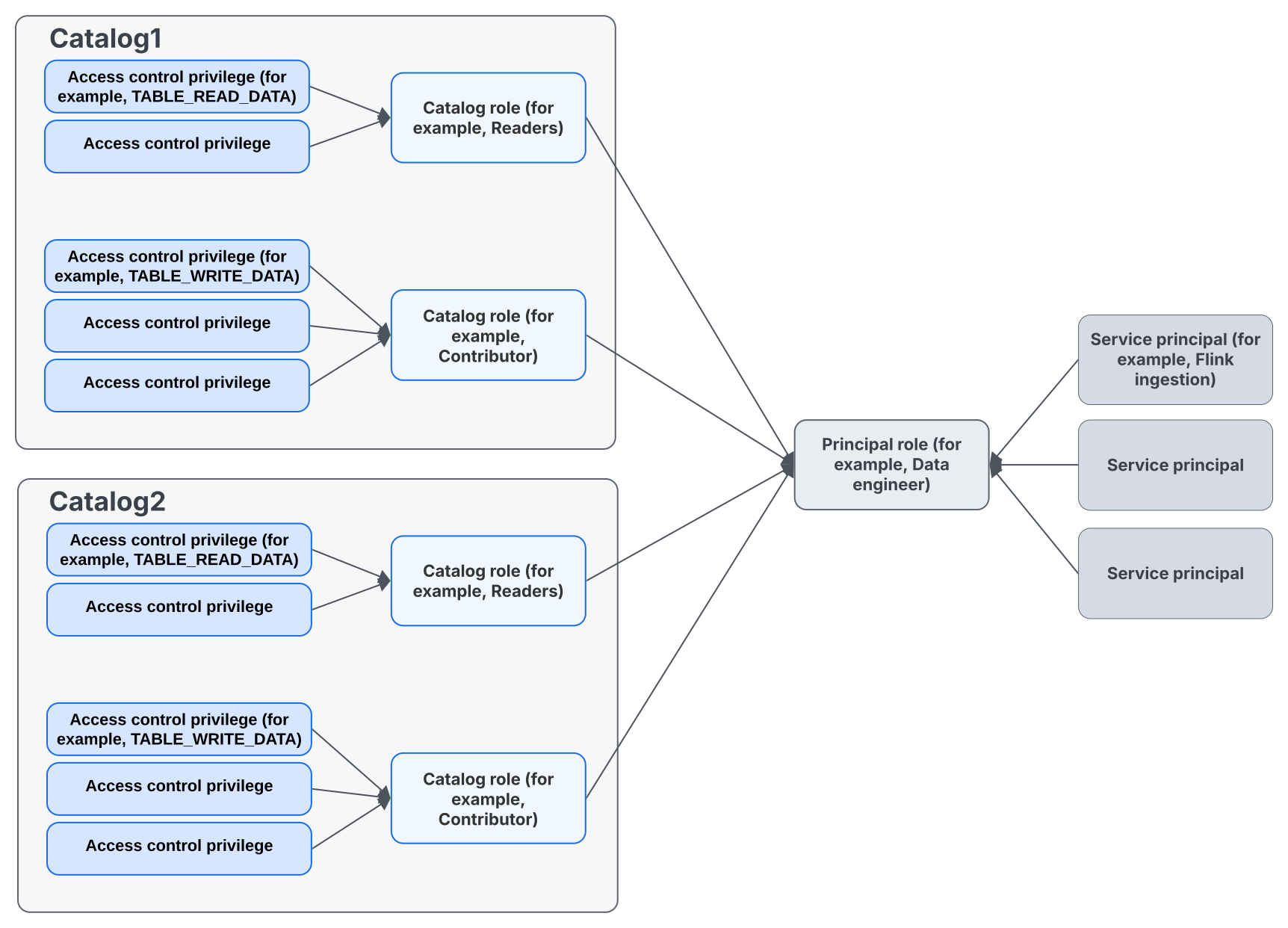
The following diagram illustrates the RBAC model used by Polaris. For each catalog, the Polaris administrator assigns access privileges to catalog roles and then grants principals access to resources by assigning catalog roles to principal roles. Polaris supports a many-to-many relationship between principals and principal roles.
Access control privileges🔗
This section describes the privileges that are available in the Polaris access control model. Privileges are granted to catalog roles, catalog roles are granted to principal roles, and principal roles are granted to principals to specify the operations that principals can perform on objects in Polaris.
To grant the full set of privileges (drop, list, read, write, etc.) on an object, you can use the full privilege option.
Table privileges🔗
| Privilege | Description |
|---|---|
| TABLE_CREATE | Enables registering a table with the catalog. |
| TABLE_DROP | Enables dropping a table from the catalog. |
| TABLE_LIST | Enables listing any table in the catalog. |
| TABLE_READ_PROPERTIES | Enables reading properties of the table. |
| TABLE_WRITE_PROPERTIES | Enables configuring properties for the table. |
| TABLE_READ_DATA | Enables reading data from the table by receiving short-lived read-only storage credentials from the catalog. |
| TABLE_WRITE_DATA | Enables writing data to the table by receiving short-lived read+write storage credentials from the catalog. |
| TABLE_READ_METRICS | Enables reading table scan and commit metrics reports. Does not grant access to table data. Can be granted on any table, but metrics reports are currently only produced for Iceberg tables. |
| TABLE_FULL_METADATA | Grants all table privileges, except TABLE_READ_DATA and TABLE_WRITE_DATA, which need to be granted individually. |
| TABLE_ATTACH_POLICY | Enables attaching policy to a table. |
| TABLE_DETACH_POLICY | Enables detaching policy from a table. |
View privileges🔗
| Privilege | Description |
|---|---|
| VIEW_CREATE | Enables registering a view with the catalog. |
| VIEW_DROP | Enables dropping a view from the catalog. |
| VIEW_LIST | Enables listing any views in the catalog. |
| VIEW_READ_PROPERTIES | Enables reading all the view properties. |
| VIEW_WRITE_PROPERTIES | Enables configuring view properties. |
| VIEW_FULL_METADATA | Grants all view privileges. |
⚠️ Warning
Table and view properties are readable metadata. Principals withTABLE_READ_PROPERTIES / TABLE_FULL_METADATA or VIEW_READ_PROPERTIES /
VIEW_FULL_METADATA can read them. Do not store passwords, tokens, access
keys, or other secrets in table or view properties.Namespace privileges🔗
| Privilege | Description |
|---|---|
| NAMESPACE_CREATE | Enables creating a namespace in a catalog. |
| NAMESPACE_DROP | Enables dropping the namespace from the catalog. |
| NAMESPACE_LIST | Enables listing any object in the namespace, including nested namespaces and tables. |
| NAMESPACE_READ_PROPERTIES | Enables reading all the namespace properties. |
| NAMESPACE_WRITE_PROPERTIES | Enables configuring namespace properties. |
| NAMESPACE_FULL_METADATA | Grants all namespace privileges. |
| NAMESPACE_ATTACH_POLICY | Enables attaching policy to a namespace. |
| NAMESPACE_DETACH_POLICY | Enables detaching policy from a namespace. |
Catalog privileges🔗
| Privilege | Description |
|---|---|
| CATALOG_MANAGE_ACCESS | Includes the ability to grant or revoke privileges on objects in a catalog to catalog roles, and the ability to grant or revoke catalog roles to or from principal roles. |
| CATALOG_MANAGE_CONTENT | Enables full management of content for the catalog. This privilege encompasses the following privileges:
|
| CATALOG_MANAGE_METADATA | Enables full management of the catalog, catalog roles, namespaces, and tables. |
| CATALOG_READ_PROPERTIES | Enables listing catalogs and reading properties of the catalog. |
| CATALOG_WRITE_PROPERTIES | Enables configuring catalog properties. |
| CATALOG_ATTACH_POLICY | Enables attaching policy to a catalog. |
| CATALOG_DETACH_POLICY | Enables detaching policy from a catalog. |
Policy privileges🔗
| Privilege | Description |
|---|---|
| POLICY_CREATE | Enables creating a policy under specified namespace. |
| POLICY_READ | Enables reading policy content and metadata. |
| POLICY_WRITE | Enables updating the policy details such as its content or description. |
| POLICY_LIST | Enables listing any policy from the catalog. |
| POLICY_DROP | Enables dropping a policy if it is not attached to any resource entity. |
| POLICY_FULL_METADATA | Grants all policy privileges. |
| POLICY_ATTACH | Enables policy to be attached to entities. |
| POLICY_DETACH | Enables policy to be detached from entities. |
Semantic model privileges🔗
Semantic models use their own privileges, independently of table and view privileges. The management API supports grants on individual models and at namespace or catalog scope. Model-scoped grant inspection is deferred; model grants appear in the existing catalog-role grant listing.
| Privilege | Target | Description |
|---|---|---|
| SEMANTIC_MODEL_LIST | Namespace | Lists model identifiers in the namespace. |
| SEMANTIC_MODEL_CREATE | Namespace | Creates a model in the namespace. |
| SEMANTIC_MODEL_READ | Semantic model | Reads the model document and metadata. |
| SEMANTIC_MODEL_WRITE | Semantic model | Updates the model document and permits reading it. |
| SEMANTIC_MODEL_DROP | Semantic model | Deletes the model. |
| SEMANTIC_MODEL_FULL_METADATA | Semantic model | Grants list, create, read, update, and drop privileges; list and create apply only at namespace or catalog scope. |
| SEMANTIC_MODEL_MANAGE_GRANTS_ON_SECURABLE | Semantic model | Permits granting privileges on the model to catalog roles. Revocation also requires authority to manage the recipient role’s grants. |
Privileges granted on a namespace or catalog apply to descendant models. At these scopes,
SEMANTIC_MODEL_CREATE, SEMANTIC_MODEL_READ, and SEMANTIC_MODEL_WRITE
also permit listing models, matching table and view privileges.
SEMANTIC_MODEL_FULL_METADATA grants list, create, read, update, and drop access within that scope.
CATALOG_MANAGE_METADATA and CATALOG_MANAGE_CONTENT also cover semantic model metadata
operations within their scope. NAMESPACE_FULL_METADATA and CATALOG_FULL_METADATA cover
namespace and catalog metadata operations, respectively, and do not imply semantic model privileges.
These metadata privileges do not confer grant management. Single-model grants require
SEMANTIC_MODEL_MANAGE_GRANTS_ON_SECURABLE on the model. Revocation additionally requires
CATALOG_ROLE_MANAGE_GRANTS_FOR_GRANTEE on the recipient role, following policy grant semantics.
CATALOG_MANAGE_ACCESS can satisfy these grant-management checks within its scope.
Namespace/catalog grants continue to use the existing namespace/catalog grant-management permissions.
Model authorization is independent of source table/view privileges. Source-access authorization on create/update and propagated read-time checks are deferred. Model privileges do not grant access to the underlying tables or views.
Use the existing management grant endpoint
PUT /api/management/v1/catalogs/{catalogName}/catalog-roles/{catalogRoleName}/grants
with a namespace grant, for example, to allow reading models in the sales namespace:
{
  "grant": {
    "type": "namespace",
    "namespace": ["sales"],
    "privilege": "SEMANTIC_MODEL_READ"
  }
}
For catalog-wide access, use type: "catalog" and omit namespace. To grant access only to
the revenue model in the sales namespace, use:
{
  "grant": {
    "type": "semantic-model",
    "namespace": ["sales"],
    "semanticModelName": "revenue",
    "privilege": "SEMANTIC_MODEL_READ"
  }
}
Single-model grants can provide read, write, drop, full metadata, or grant-management access.
They do not permit listing or creating models in the containing namespace; list and create
privileges must be granted at namespace or catalog scope.
Grant revocation uses the same request body with POST to the role’s grants endpoint.
The existing role-grants listing returns grants with their model, namespace, or catalog scope.
RBAC example🔗
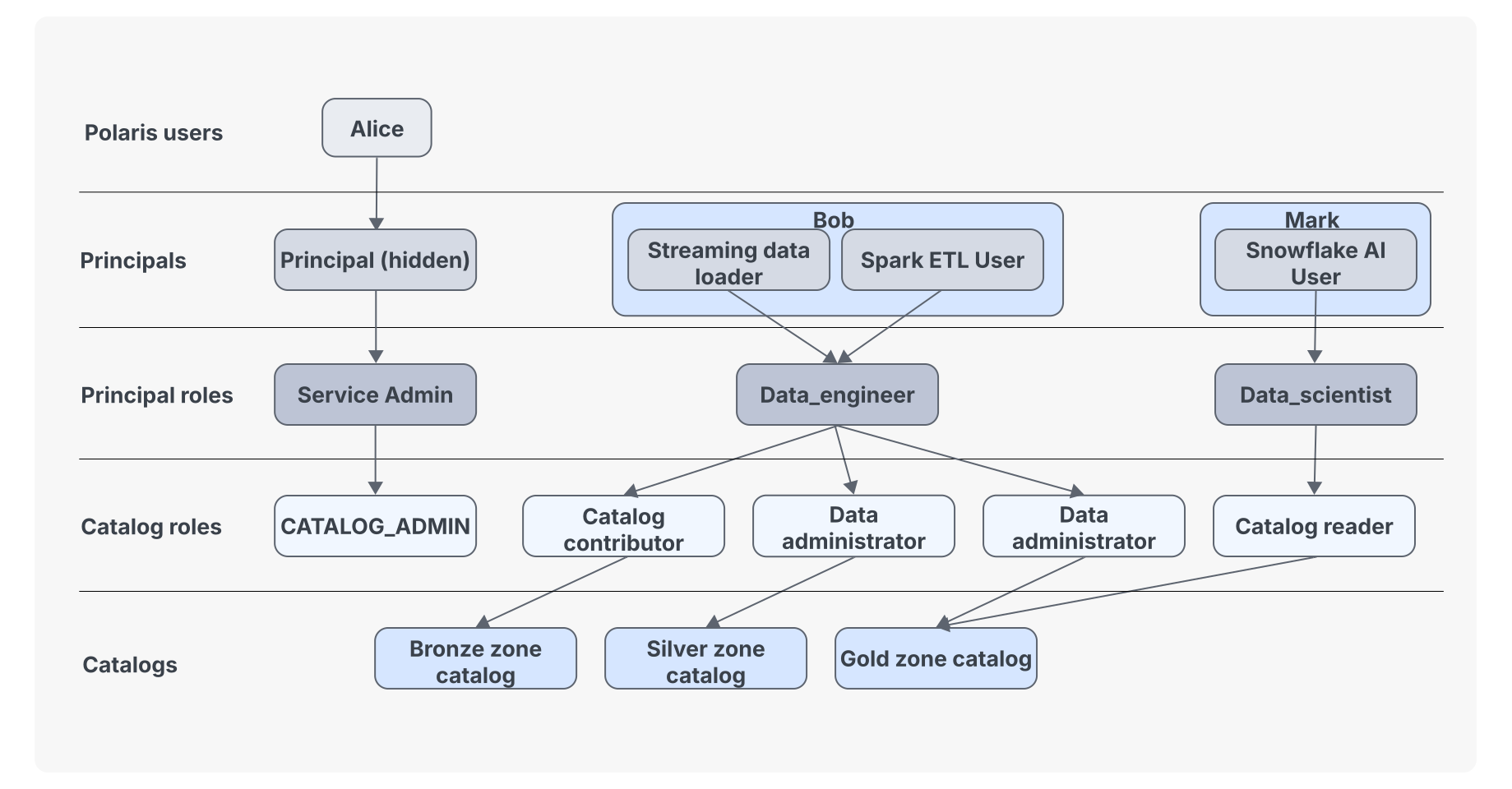
The following diagram illustrates how RBAC works in Polaris and includes the following users:
Alice: A service admin who signs up for Polaris. Alice can create principals. She can also create catalogs and namespaces and configure access control for Polaris resources.
Bob: A data engineer who uses Apache Spark™ to interact with Polaris.
Alice has created a principal for Bob. It has been granted the Data_engineer principal role, which in turn has been granted the following catalog roles: Catalog contributor and Data administrator (for both the Silver and Gold zone catalogs in the following diagram).
The Catalog contributor role grants permission to create namespaces and tables in the Bronze zone catalog.
The Data administrator roles grant full administrative rights to the Silver zone catalog and Gold zone catalog.
Mark: A data scientist who uses trains models with data managed by Polaris.
Alice has created a principal for Mark. It has been granted the Data_scientist principal role, which in turn has been granted the catalog role named Catalog reader.
The Catalog reader role grants read-only access for a catalog named Gold zone catalog.