Floe and Apache Polaris: Policy-Driven Table Maintenance for Apache Iceberg
Introduction🔗
Iceberg tables accumulate technical debt over time. Small files multiply as streaming jobs append data in micro-batches. Delete files pile up from CDC workloads. Snapshots grow unbounded, bloating metadata. Without regular maintenance, query performance degrades, storage costs rise, and planning times stretch from milliseconds to seconds.
Apache Polaris provides a vendor-neutral Iceberg catalog with governance and access control, but it does not execute maintenance operations. The catalog manages metadata and enforces permissions. Compaction, snapshot expiration, orphan cleanup, and manifest optimization remain the user’s responsibility.
Floe fills that gap. It connects to Polaris, discovers tables, evaluates their health, and orchestrates maintenance through policy-driven automation. Instead of writing custom scripts or manually running Spark jobs, you define policies that specify what maintenance to perform, which tables to target, and under what conditions to trigger execution. Floe handles the rest: scheduling, execution via Spark or Trino, and tracking outcomes.
Architecture🔗
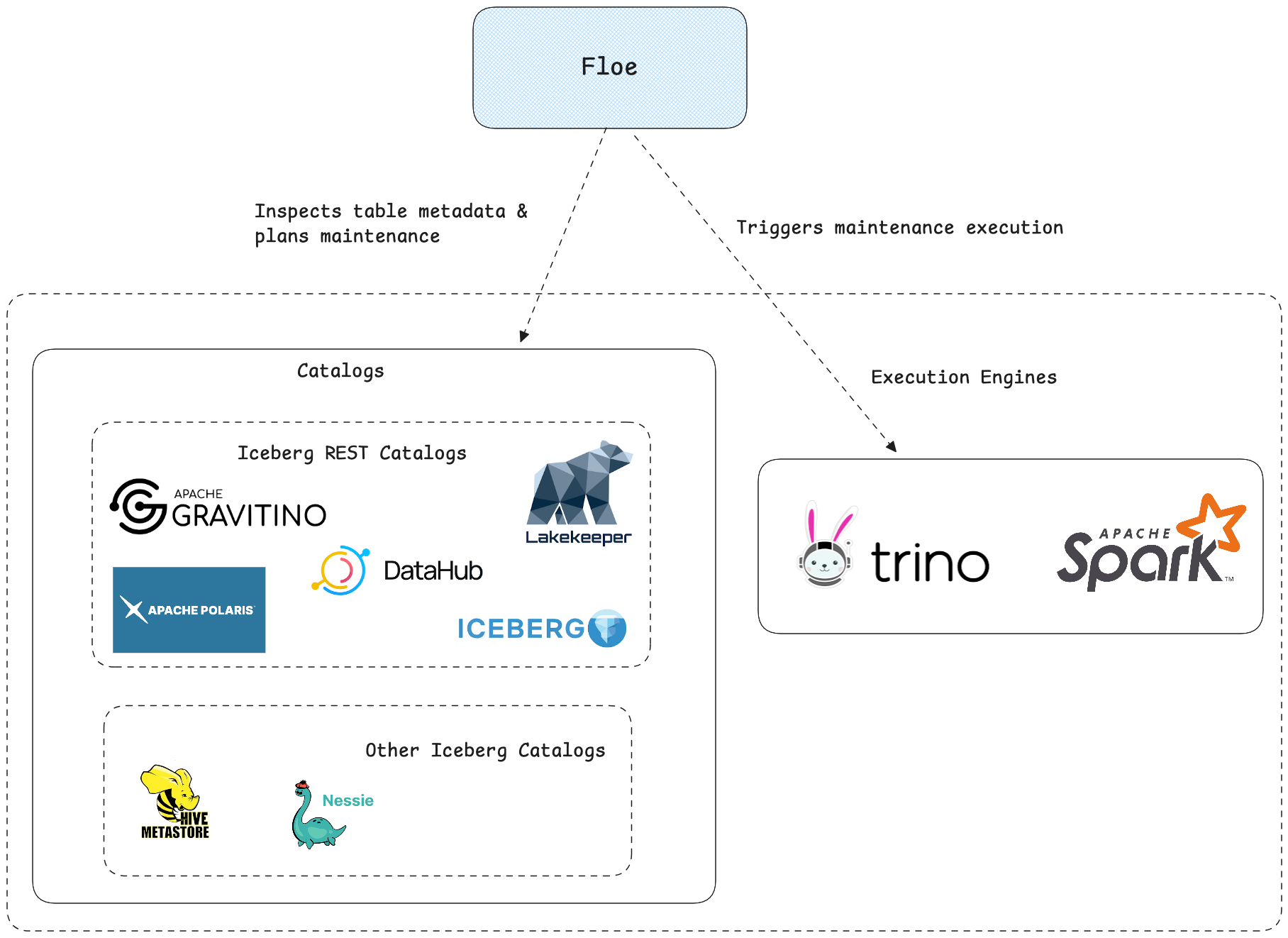
Polaris remains the source of truth for metadata and access control. Floe reads the catalog, evaluates policies, triggers maintenance on your chosen engine, and records outcomes.
Data Flow🔗
- Policy discovery: Floe loads enabled policies and matches them to tables.
- Health assessment: Floe evaluates table health based on scan mode and thresholds.
- Planning & gating: The planner selects operations; trigger conditions decide if they run.
- Execution: The orchestrator dispatches operations to Spark or Trino.
- Persistence: Results and health history are stored for tracking and recommendations.
Quick Start🔗
1git clone https://github.com/nssalian/floe
2cd floe
3make example-polaris
This starts Polaris, MinIO, and Floe with a demo catalog, creates sample Iceberg tables, and configures demo policies.
- Floe UI: http://localhost:9091/ui
- Floe API: http://localhost:9091/api/
For Trino instead of Spark, run make clean first, then make example-polaris-trino.
Configuration🔗
1FLOE_CATALOG_TYPE=POLARIS
2FLOE_CATALOG_NAME=demo
3FLOE_CATALOG_POLARIS_URI=http://polaris:8181/api/catalog
4FLOE_CATALOG_POLARIS_CLIENT_ID=root
5FLOE_CATALOG_POLARIS_CLIENT_SECRET=secret
6FLOE_CATALOG_WAREHOUSE=demo
Note: For Polaris, FLOE_CATALOG_WAREHOUSE is the catalog name, not an S3 path.
Defining Policies🔗
Policies define maintenance operations and target tables via patterns:
 1curl -s -X POST "http://localhost:9091/api/v1/policies" \
 2  -H "Content-Type: application/json" \
 3  -d '{
 4    "name": "orders-maintenance",
 5    "tablePattern": "demo.test.*",
 6    "priority": 50,
 7    "rewriteDataFiles": {
 8      "strategy": "BINPACK",
 9      "targetFileSizeBytes": 134217728
10    },
11    "expireSnapshots": {
12      "retainLast": 10,
13      "maxSnapshotAge": "P7D"
14    },
15    "orphanCleanup": {
16      "retentionPeriodInDays": 3
17    },
18    "rewriteManifests": {}
19  }'
Operations: rewriteDataFiles, expireSnapshots, orphanCleanup, rewriteManifests.
Triggering Maintenance🔗
1curl -X POST http://localhost:9091/api/v1/maintenance/trigger \
2  -H "Content-Type: application/json" \
3  -d '{
4    "catalog": "demo",
5    "namespace": "test",
6    "table": "orders"
7}'
Monitor progress via UI at /ui/operations or API at /api/v1/operations.
Floe UI🔗
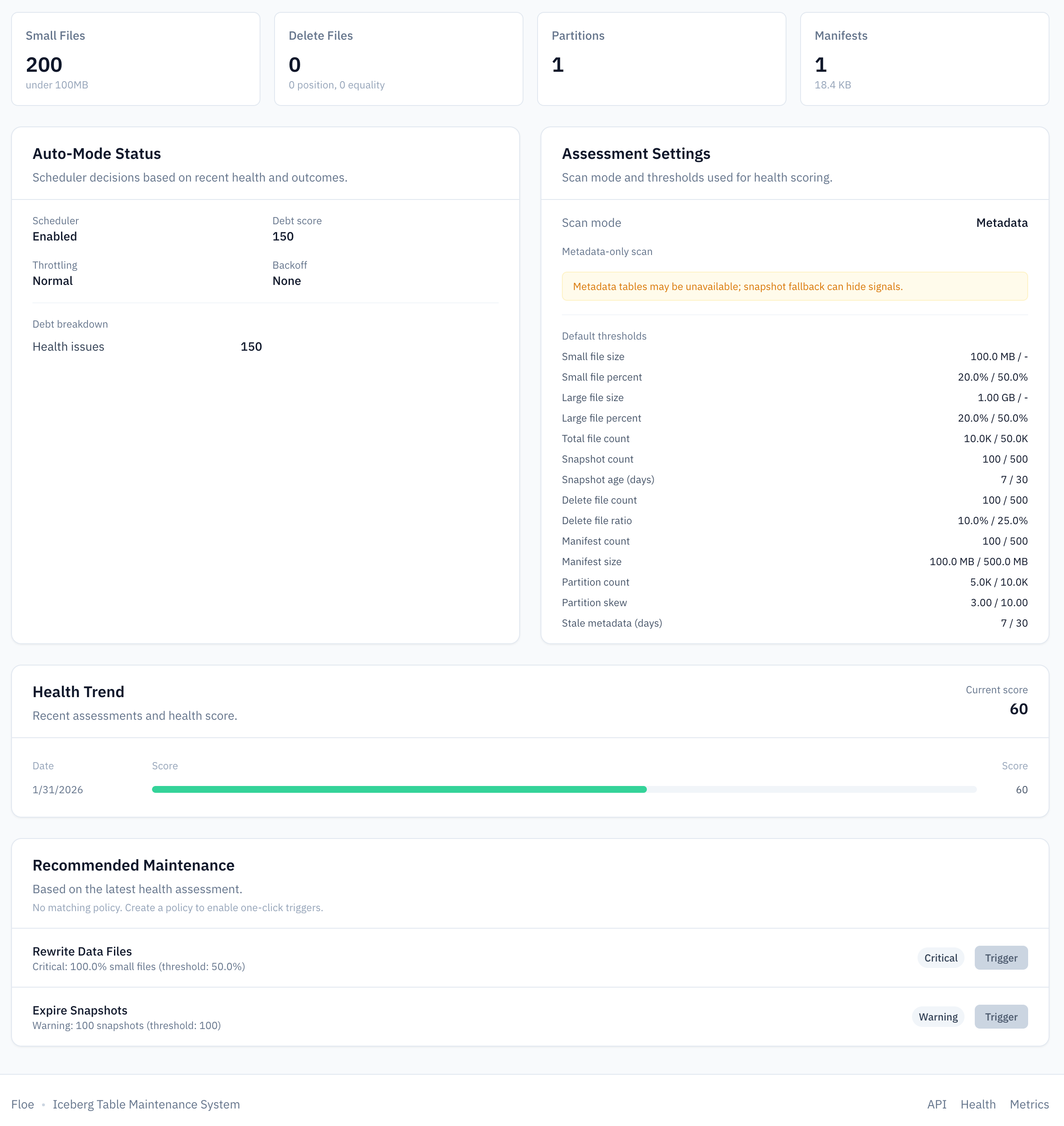
Floe includes a web UI for managing policies and monitoring table health. The table view shows metadata alongside health indicators (snapshot count, small file percentage, delete file ratio) so you can see at a glance which tables need attention:
Health Reporting🔗
1curl http://localhost:9091/api/v1/tables/test/orders/health
Reports include: snapshot count/age, small file percentage, delete file count, partition skew, manifest size.
Scan modes: metadata (default), scan, sample.
1floe.health.scan-mode=metadata
2floe.health.sample-limit=10000
3floe.health.persistence-enabled=true
4floe.health.max-reports-per-table=100
The metadata mode is fast but only sees file-level statistics. Use scan or sample when you need accurate small-file detection based on actual file sizes.
Automated Scheduling🔗
The scheduler computes a debt score per table based on health issues, time since last maintenance, and failure rate. Higher scores are prioritized.
1floe.scheduler.enabled=true
2floe.scheduler.max-tables-per-poll=10
3floe.scheduler.max-bytes-per-hour=10737418240
4floe.scheduler.failure-backoff-threshold=3
5floe.scheduler.failure-backoff-hours=6
6floe.scheduler.zero-change-threshold=5
7floe.scheduler.condition-based-triggering-enabled=true
Key tuning parameters:
max-bytes-per-hour: Caps total bytes rewritten to avoid overwhelming storage I/Ofailure-backoff-threshold/failure-backoff-hours: Prevents repeatedly retrying failing tableszero-change-threshold: Reduces frequency for tables that consistently have no work to do
Signal-Based Triggering🔗
Gate execution based on table health instead of pure cron:
 1curl -s -X POST "http://localhost:9091/api/v1/policies" \
 2  -H "Content-Type: application/json" \
 3  -d '{
 4    "name": "smart-compaction",
 5    "tablePattern": "demo.test.*",
 6    "priority": 100,
 7    "rewriteDataFiles": {
 8      "strategy": "BINPACK",
 9      "targetFileSizeBytes": 134217728
10    },
11    "triggerConditions": {
12      "smallFilePercentageAbove": 20,
13      "deleteFileCountAbove": 50,
14      "minIntervalMinutes": 60
15    }
16  }'
Triggers when any condition is met (default OR logic) or when all conditions are met if triggerLogic is set to AND, and the min interval has elapsed.
For critical tables, force execution when max delay is exceeded:
1{
2  "triggerConditions": {
3    "smallFilePercentageAbove": 30,
4    "criticalPipeline": true,
5    "criticalPipelineMaxDelayMinutes": 360
6  }
7}
Policies without triggerConditions run whenever the scheduler picks them up, preserving the original behavior.
Execution Engines🔗
Floe supports Spark (via Livy) and Trino as execution engines.
Spark configuration:
1FLOE_ENGINE_TYPE=SPARK
2FLOE_LIVY_URL=http://livy:8998
Trino configuration:
1FLOE_ENGINE_TYPE=TRINO
2FLOE_TRINO_JDBC_URL=jdbc:trino://trino:8080
3FLOE_TRINO_CATALOG=demo
Security🔗
- Enable authentication:
FLOE_AUTH_ENABLED=true - Floe uses its own storage credentials; Polaris credentials are only used for catalog access
- Run Floe in the same network as Polaris and engines
Conclusion🔗
Apache Polaris and Floe complement each other well. Polaris provides the catalog layer (metadata management, access control, credential vending) while Floe provides the maintenance layer that keeps Iceberg tables healthy and performant. Together they give you centralized governance, automated maintenance, health visibility, and flexible execution on Spark or Trino.
Run make example-polaris to try the integration locally, or check out the Floe documentation for deployment options.